

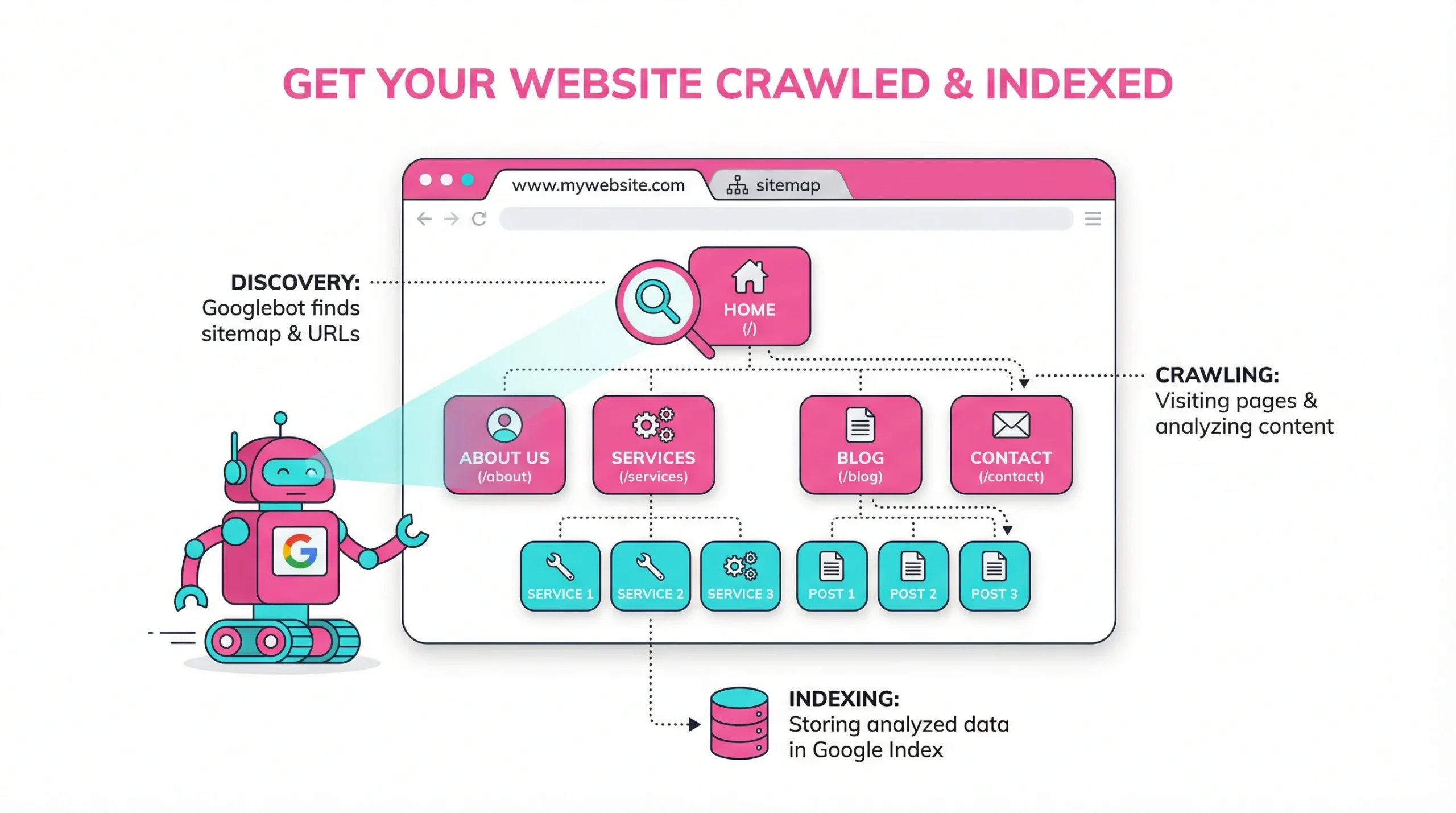
Understanding the Google Indexing Process
Getting your content visible in search results starts long before anyone types a query. Most website traffic comes from organic search, which makes it essential to know how to get your pages discovered in the first place. This website traffic comes from organic sources because search engines have successfully mapped your site. The process involves discovery, analysis, and storage — and understanding each phase helps you take control of that visibility.
How Search Engines Discover and Index Your Pages
Google and other search engines use automated programs called crawlers to scan the web. When a crawler visits your domain, it follows links, reads content, and passes data back to Google’s servers. Pages on your website are evaluated, parsed, and added to a vast database Google uses for search. Google and other search engines follow a broadly similar discovery process, though ranking criteria and crawl priorities differ.
Role of Content Quality in Helping Google to Index Your Website
Content quality is one of the most direct signals to Google that a page deserves to be stored and surfaced in results. All content on your website contributes to how Google evaluates your domain’s authority. Thin, duplicated, or low-value pages are frequently skipped during processing. Google’s systems assess whether content provides genuine value — answering questions clearly, offering unique perspectives, or delivering practical guidance.
Pages that consistently deliver value are crawled more often. Investing in depth, accuracy, and originality pays off directly in how frequently your content is revisited and re-evaluated by the search registry.
Impact of E-E-A-T Signals to Get Your Site Indexed
Experience, Expertise, Authoritativeness, and Trustworthiness — collectively known as E-E-A-T — influence how Google evaluates what you publish. Sites that demonstrate subject matter expertise, cite credible sources, and build a reputation over time tend to be recognized and ranked more reliably.
For a new website, building E-E-A-T takes time. Starting with well-attributed, factually accurate content creates a foundation that supports faster and more consistent visibility in the search directory going forward.
Mechanisms Behind How Google to Crawl Your Website
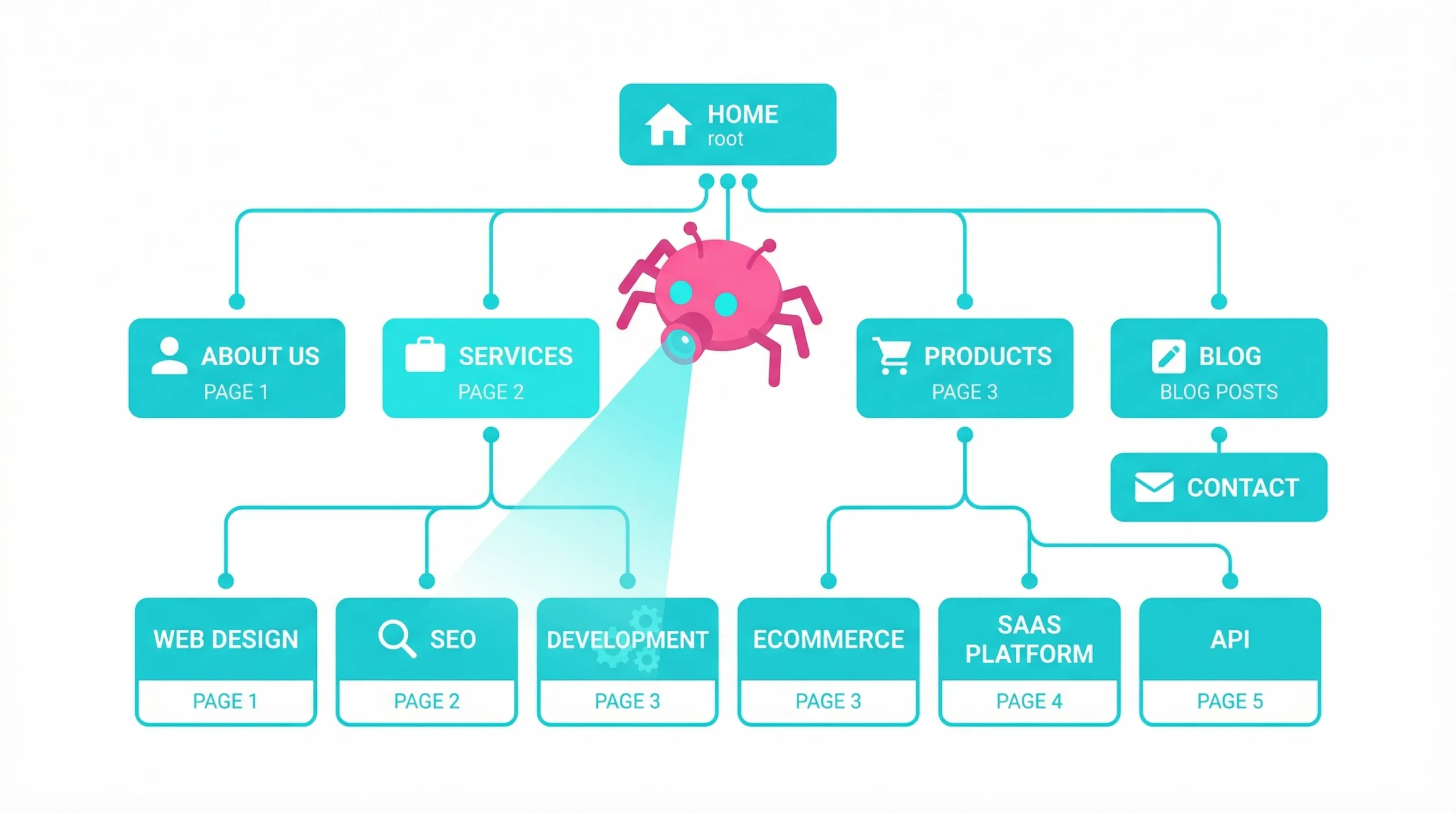
Understanding what happens under the hood helps you make better technical decisions. If you want to get your website crawled by Google efficiently, knowing how its infrastructure works gives you a real advantage. To get google to crawl your website effectively, you must understand that its infrastructure is complex, but its core mechanics follow predictable patterns you can actively optimize for.
Functions of Web Spiders to Get Your Website Crawled
Googlebot — Google’s primary web spider — operates across millions of URLs every day. Its job is to request pages, render JavaScript, and extract links for further exploration. For Google to crawl your site effectively, your server must respond promptly and your HTML must be accessible without unnecessary barriers.
Key factors that make it easier for google to behave correctly on your domain:
- Server response time and consistent uptime
- Presence of a valid and up-to-date sitemap so google can easily find your files
- Depth of internal linking across your domain
- Absence of crawler-blocking directives in robots.txt
Building a Search Index for Faster Retrieval
Once a page is crawled by Google, it enters the processing pipeline. Google analyzes the text, images, and structured data on each page, then stores a processed version of this content for fast retrieval when relevant search queries arrive.
A well-structured page — featuring clear headings, descriptive metadata, and logical content hierarchy — tends to be stored and matched against user intent more efficiently than one without clear organization.
Evolution of Algorithms to Index Your Website Effectively
Google’s discovery and ranking systems have changed significantly over the years. Early approaches relied heavily on keyword frequency; modern systems assess semantic relationships, entity recognition, and engagement signals. Understanding this evolution matters because tactics that once guaranteed fast results — such as keyword stuffing — now work against your search directory status.
How to Check if Google Has Indexed Your Website
Before optimizing, you should know how to get an accurate view of your status. Several methods allow you to verify whether specific pages on your website currently appear in google search results. When you use google search console regularly, checking visibility status becomes a straightforward routine.
Using Site Query Commands to Verify Index Status
A quick way to check whether Google has stored your content is to use google search directly with the site: operator. Typing site:
$$yourdomain$$
in the search bar returns a snapshot of pages Google currently recognizes. For a large website, the actual count of pages on google may differ from what this query displays, as it is an approximation rather than a precise count.
Troubleshooting via URL Inspection to Get Indexed
The URL Inspection tool within Google Search Console provides a more precise picture than a search bar query. Entering a specific URL reveals its current status in search, the last time Googlebot visited it, and any issues blocking it from appearing in google search results. When you use google search console for this purpose, you get direct insight into what Googlebot actually sees.
This tool is particularly useful when a page isn’t visible in results despite being live and linked. It frequently surfaces specific errors — such as blocked resources or noindex tags — that explain why the page has been excluded from the database.
Reviewing the Index Coverage Report in Search Console
The Index Coverage Report in Google Search Console groups your pages into four clear categories:
- Valid: Pages stored and eligible to appear in results
- Valid with warnings: Stored but with potential issues flagged
- Excluded: Not stored, often by intentional directive
- Error: Excluded due to a crawl or processing problem
Reviewing this report regularly catches issues before they compound. A spike in errors often traces back to a technical change made during a recent site update, making it easier for google to communicate issues to you.
Analyzing Page Cache to Confirm Website Indexed by Google
Historically, checking Google’s cached version of a page confirmed it had been processed and when. While the cache feature has been scaled back in recent updates, the URL Inspection tool now serves as its functional replacement — confirming that a page is recognized in the search results and when Google last processed it.
Best Ways to Get Google to Index Your Site Quickly
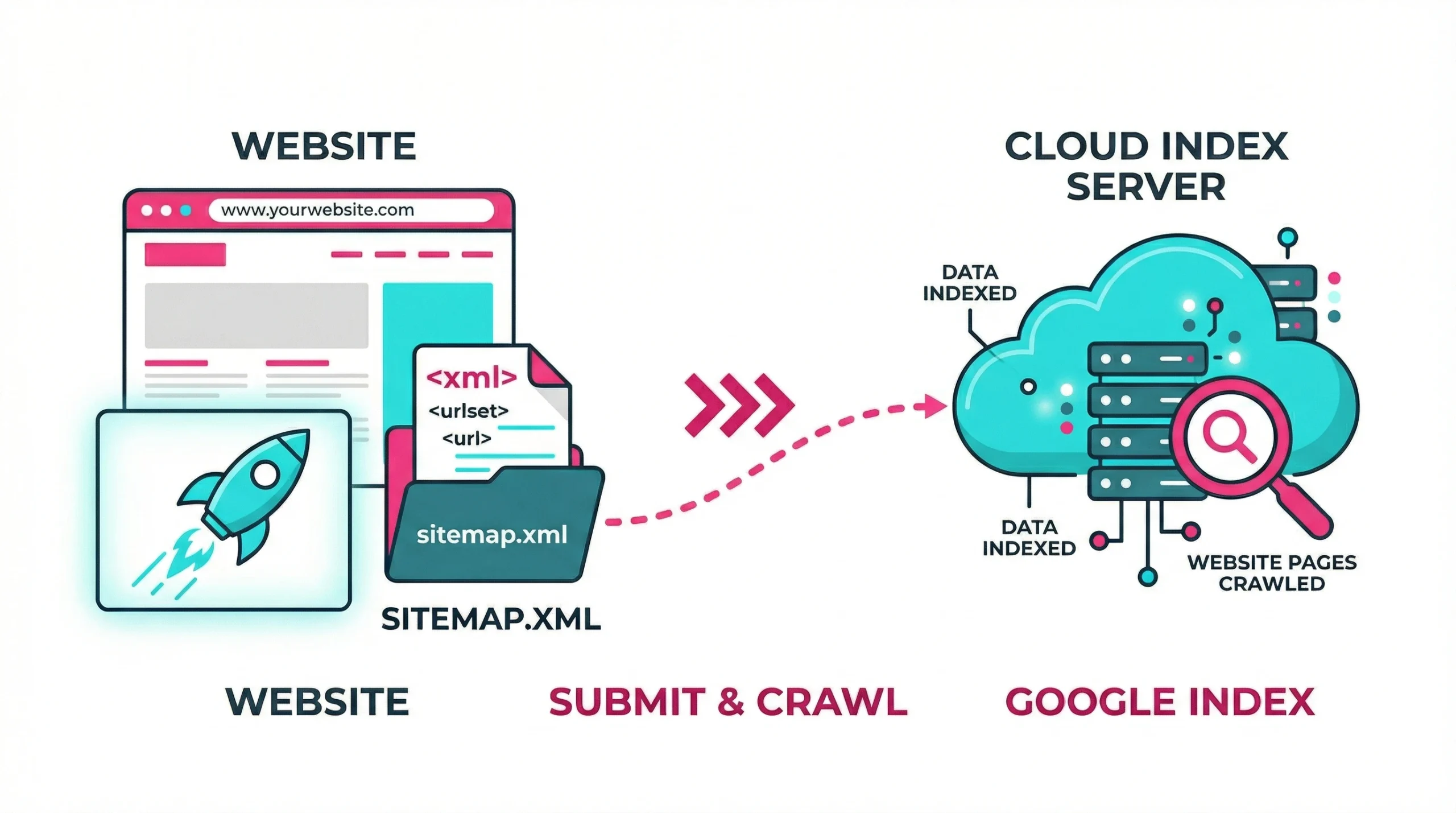
Speed matters, especially for time-sensitive content. If you want to get your website visible as quickly as possible, the following approaches reliably accelerate the path from publication to pages on google. To ensure your website is processed efficiently, you must adopt these proactive measures.
Submitting XML Sitemaps to Get Your Website Indexed
A sitemap is one of the clearest ways to tell search engines which pages you want visible in google search results. Google XML sitemaps use a structured format listing URLs alongside metadata such as last modification date and update frequency.
To submit a sitemap effectively:
- Generate it using your CMS or a dedicated plugin
- Upload it to your root domain, typically at /sitemap.xml
- Use google search console to submit the URL under the Sitemaps section
- Monitor submission status and resolve any reported errors promptly
For a large website, segmenting sitemaps by content type or site section improves crawl efficiency and makes it easier for google to find specific categories.
Manual Submissions to Get Google to Crawl Specific URLs
When you publish a high-priority page and want it visible in google search results quickly, use the Request Indexing feature within the URL Inspection tool. This sends a direct signal to Google that the page is ready for review. It is a request, not a guarantee — processing times vary depending on Google’s server load and the page’s perceived priority.
Internal Linking Strategies to Get Crawled and Indexed
Internal links guide crawlers through your content hierarchy. A strong internal linking structure makes it easier for google to discover and process newer or less-visible pages. When you link from well-established pages to fresh content, you increase the likelihood those pages are discovered and added to the search database faster.
Effective internal linking practices:
- Link from high-traffic pages to newly published content
- Use descriptive anchor text that reflects the target page’s topic
- Avoid orphan pages with no inbound internal links
- Keep link depth manageable so key content is reachable within a few clicks
Leveraging the API to Get Google to Index Your Site Instantly
Google offers an Indexing API designed primarily for job postings and livestream content. This ensures your website stays current in high-stakes results. The API sends a direct notification when a page is added or updated, which can significantly reduce the gap between publication and visibility for high-volume sites.
Social Sharing and Traffic Signals to Get Indexed Faster
Social media links are generally nofollow and do not pass direct ranking value. However, they do drive real user traffic back to your website — which signals to Google that a page exists and is receiving attention. This can prompt a crawl visit sooner than standard scheduling would allow, particularly for a new website without an established crawl cadence.
Technical SEO Fixes to Get Google to Index Your Website
Technical barriers are among the most common reasons pages fail to appear in google search results. Addressing these issues is foundational to any long-term strategy.
Managing Robots.txt to Allow Google to Crawl
The robots.txt file tells crawlers which sections of your site they are permitted to access. Accidentally blocking google from finding important directories is a frequent source of failures. A directive such as Disallow: / blocks your entire site. Even partial restrictions, if applied to the wrong folders, can prevent large portions of your content from reaching the database.
Correct Use of Canonical Tags for Proper Indexing
Canonical tags signal to Google which version of a page should be treated as authoritative when duplicate or near-duplicate content exists. Misconfigured canonicals can inadvertently suppress the very pages you want visible.
Common canonical mistakes to avoid:
- Self-referencing canonicals pointing to the wrong URL variant
- Canonicals applied to paginated content without a deliberate strategy
- Cross-domain canonicals that redirect authority away from your main domain
Removing Noindex Tags to Get Your Site Indexed
A noindex directive in a page’s meta robots tag explicitly instructs Google not to include that page in its database. This tag is often added during site development and forgotten when the site goes live. Audit your pages regularly for noindex tags, especially following major migrations. The URL Inspection tool will flag these when you examine a specific URL so google can easily show you the blockage.
Optimizing for Mobile-First Indexing Requirements
Google predominantly uses the mobile version of your pages for storage and ranking. If your mobile experience differs significantly from desktop — missing content, broken structured data, or slower load times — it can negatively affect how pages are cataloged.
Ensure all content visible on desktop is equally accessible on mobile, and use google search tools to identify rendering issues before they become storage problems.
Improving Site Speed to Help Google to Index Your Site
Site speed affects both user experience and crawl efficiency. A slow server means Googlebot spends more of your crawl budget waiting for pages to load, which reduces the number of pages cataloged per session. According to Google’s crawl budget documentation, managing crawl efficiency is particularly important for large websites.
Prioritize the following improvements:
- Enable browser caching and server-side compression
- Reduce server response time (Time to First Byte)
- Minimize render-blocking JavaScript
- Optimize image file sizes without sacrificing visual quality
Resolving Issues When Google Indexes Your Pages
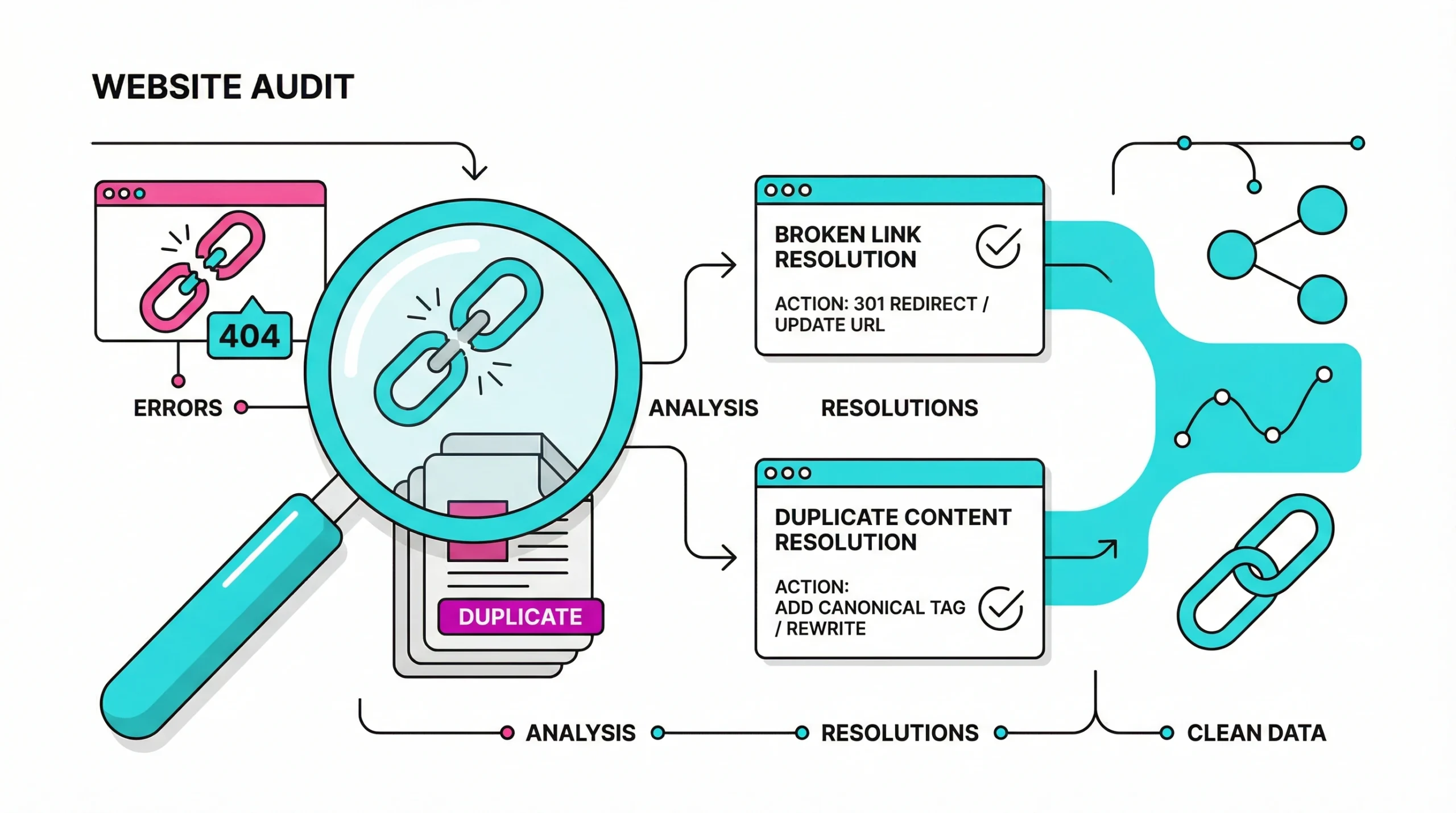
Even well-maintained sites encounter processing problems. Knowing how to diagnose and fix them is an ongoing part of technical SEO management.
Dealing with Duplicate Content and Canonical Issues
Duplicate content confuses crawlers and dilutes signals. When multiple URLs serve similar content, Google must decide which version to store — and it may not choose the one you prefer. Consolidating duplicates through canonical tags or 301 redirects ensures your preferred pages are the ones that enter the search listing.
Fixing Redirect Loops to Get Crawled and Indexed by Google
Redirect loops occur when URL A redirects to URL B, which redirects back to URL A. Googlebot gives up after a limited number of redirect hops, meaning the final destination never gets cataloged. Use a crawl tool to detect and break these loops before they affect your organic visibility.
Identifying Crawler Traps to Optimize Crawl Budget
Crawler traps are URL patterns that generate infinite or near-infinite page variations — session IDs appended to URLs or faceted navigation. These exhaust your crawl budget without producing genuinely useful content.
Common crawler trap sources:
- Session parameters persisting in URLs
- Faceted navigation generating unique URL combinations for every filter
- Date-based archive pages with no logical end point
- Infinite scroll implementations that generate new URLs dynamically
Monitoring Domain Variations to Ensure Site Indexed Correctly
If your site is accessible via multiple domain variations — www and non-www, or HTTP and HTTPS — Google may catalog duplicate versions. Set a preferred domain in Google Search Console and implement consistent 301 redirects to consolidate authority under a single canonical version.
Advanced Tools to Get Google to Index
Utilizing Search Console Reports to Get Google to Index Your Pages
Google Search Console remains the most direct way to monitor and influence how your pages appear in search results. Beyond the Coverage Report, the Performance Report reveals which search queries drive impressions and clicks, helping identify which pages need further optimization.
Practical uses for Search Console:
- Track visibility trends and error rates over time
- Identify pages with high impressions but low click-through rates
- Detect manual actions or security issues affecting your domain
- Submit and monitor sitemap performance
Third-Party Services to Help Google Index Your Site
Several tools complement your work with google search console for managing crawling at scale. Each addresses a different layer of the technical SEO stack:
- Screaming Frog SEO Spider — Crawls your site as Googlebot would, surfacing broken links, redirect chains, and missing metadata. Visit Screaming Frog
- Ahrefs Site Audit — Provides a comprehensive health score with a prioritized list of technical issues affecting visibility. Visit Ahrefs
- Sitebulb — Offers visual crawl maps and explanatory hints that clarify why specific pages may not be stored. Visit Sitebulb
Automation and Scripts to Get Your Website Crawled and Indexed
For large websites, manual monitoring quickly becomes unmanageable. Like the Google search bots themselves, Python scripts using the Search Console API can pull coverage data on a schedule, flag new errors, and trigger storage requests for freshly published content automatically.
Frequently Asked Questions
Social media activity does not directly influence crawling, but it generates real traffic that may prompt Googlebot to visit sooner. When a newly published page receives visits shortly after going live, it creates signals that can accelerate discovery relative to standard scheduling — particularly for new domains that lack an established cadence.
Yes, hosting performance has a direct impact on outcomes. If your server is slow to respond, Googlebot may time out during attempts, reducing how many pages get processed. Consistently poor performance can train search engines to visit your domain less frequently, meaning new content takes longer to reach the search results.
Disallow in robots.txt prevents Google from crawling a page, while a noindex directive allows crawling but blocks the page from being added to the registry. A disallowed page can still appear in results if other sites link to it. A noindexed page, once crawled, is explicitly excluded from search listings.
Core Web Vitals are ranking signals rather than direct factors for storage. However, extremely poor performance can affect crawl efficiency in ways that indirectly influence how often Googlebot revisits your pages. Maintaining strong vitals ensures your website is viewed favorably by automated systems.
Google treats sitemaps as suggestions. If the pages listed carry weak quality signals or closely resemble content already stored, Google may choose not to catalog them. A sitemap aids discovery, but it does not override the quality evaluation of the content on your website.
RSS feeds serve as a supplementary discovery signal. When Google fetches your feed and finds new entries, it initiates a crawl of the linked pages sooner. Submitting your RSS feed alongside your XML sitemap is a low-effort way to add an extra notification layer for fresh content.
To protect private areas of your site, you should use google search console to identify existing indexed URLs and then apply a noindex tag or password protection. You can also use robots.txt to prevent bots from entering specific directories entirely, though this does not guarantee removal from search results if links exist elsewhere.
While not strictly necessary for every update, you should use google search console to submit critical new sections or high-value landing pages manually. This ensures your website receives immediate attention from crawlers, especially during seasonal launches or time-sensitive news events.